|
Old cell phones (3)
|
Mar 13, 2007
|
|
I'm surprised whenever I see people with really old cell phones, like the ones that look like little rectangular boxes and have single-color displays. If the person is my grandma or it's a prepaid phone, I can understand. But the people I see with these old phones are using them regularly and in public. I understand the idea of being cheap, but I also know for a fact that you can get a brand new cell phone for free every time you sign up for a service contract. Since I've never heard of a contract lasting longer than two years, and those old box phones haven't been around for about 3 or 4 years, that means you'd have to actually put in quite a bit of effort to not get a new phone. You'd have to be holding out for the past several years. I find that amazing. #technology
|
|
WordPress duplicate content (2)
|
Mar 1, 2007
|
I've been concerned for a little while now with WordPress's default functionality of creating duplicate content. Each post is located at its permalink (/2007/03/01/post-title/), its date (/2007/, /2007/03/, /2007/03/01/), its category (/topic/wordpress/), and its page with respect to the homepage (/page/3/). This might be a good thing, but to me it seems like it makes things more difficult. If somebody finds my site through a search engine, they might be directed to an old location that no longer has what they were looking for. For example, if something like /topic/wordpress/page/2/ came up in Google's search results, it might contain old data seeing that the second page of the WordPress category will inevitably change over time (since everything is sorted in reverse chronological order). The post you're currently reading will eventually move from the first page of the WordPress category, and it'll eventually continue to move on from there as I put new posts in the category.
The solution to this is with a simple plugin called Wordpress Duplicate Content Cure. If the current item that's requested is a single post, a page, or the home page and it's not paged (i.e. /page/3/), the plugin tells search engine robots to index it. If any of those conditions aren't met, it tells the robots to not index it. Simple as that.
We'll see how this works out in a few weeks or months. If it has any negative affect on my Page Rank, I'll go back to the old way. #technology
|
|
Kids and cell phones
|
Feb 15, 2007
|
|
All the kids these days have cell phones. Not even 10 years ago, cell phones were pretty uncommon. I guess when I was in high school, the cool things everybody had/wanted were (a) a car, (b) a beeper, or (c) an STD (kidding). I wonder what kids will be dying to have in 20 years from now, when my potential offspring will potentially be in high school (potentially). #technology
|
|
Website speed problems (1)
|
Feb 9, 2007
|
|
I was having some speed problems with my website for the past few weeks, and I was thinking about switching from DreamHost to something like BlueHost. I even left a comment on somebody's website when I noticed how much faster his site was than mine. He said he was with BlueHost and he uses a really stripped-down theme. My theme is pretty simple, so I knew it had to be a problem with my server. Pages were taking a long time to load, and even posting new entries was taking forever. I tried all the normal tricks like disabling sending trackbacks and pinging update services, but nothing worked. But then yesterday, things suddenly went back to normal. Everything's fast again. I have no idea what the problem was. #technology
|
|
Google Toolbar AutoFill (5)
|
Jan 31, 2007
|
The Google Toolbar has an AutoFill feature that automatically highlights form fields like name, email address, and phone number, and fills them in with the click of a button. It's an extremely useful feature, and it's one of the major reasons why I use the toolbar. However, it occasionally causes some problems. One problem I was having on my site was that the search box was being highlighted yellow because the toolbar thought it was a fillable form. I found a few attempts at a workaround but didn't find any I liked. But this one gave me an idea: Add an onload event to the body tag that changes the background color of the input field to nothing. For me, it looks like this:
<body onload="document.searchform.searchinput.style.backgroundColor = '';">
And it works perfectly. Ahh, a solution to a problem. [Edit: Maybe not; see below]
Another problem happens with a bunch of WordPress themes. For whatever reason, theme designers sometimes put labels after their corresponding inputs, so Google Toolbar sees "Name" and then fills in the following input, which is for email.
A workaround to this is to put labels chronologically before their corresponding input fields, and also to use proper labels. For example, don't use "Mail" when you mean "Email". Also, use label text sparingly. Put warnings and restrictions after the input field. For example, use "Mail" instead of "Mail (will not be published)". Put the "(will not be published)" part after the text box.
Update (2007-01-31 3:43pm): This seems to work some of the time, but not all the time. I noticed that when I navigated to a different tab in Firefox and then back to the tab with my site, the search input box was highlighted again. I give up. #technology
|
|
How many rings (7)
|
Jan 30, 2007
|
How many times should I let my co-worker's phone ring before I throw it on the floor and smash it to pieces?
Update (2007-01-31 11:48am): I completely forgot about this, but a Dilbert comic from December hit the nail on the head. #technology
|
|
Internet accessibility for the blind
|
Jan 30, 2007
|
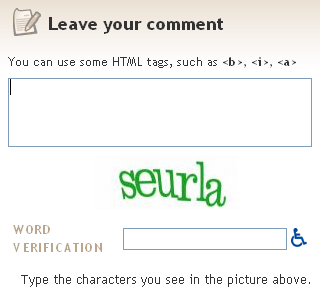
I just noticed a funny thing on a website's comment form:
After typing in a comment, the user is asked to type in a series of letters (CAPTCHA) to verify that the comment is coming from a person and not a machine trying to leave spam. There's a little handicap symbol next to the input field, and clicking on it plays a sound of a person speaking numbers (interspersed with random unintelligible noise) that will also pass the spam test. I have nothing against blind people, so I applaud things that attempt to help them without simultaneously degrading them. But I have to admit I'm slightly confused by this situation. If all things work as expected, we have- A blind person using a computer.
- Said blind person reading/hearing blogs.
- Said blind person desiring to leave a comment.
- Said blind person leaving a comment, attempting to pass spam test.
- Said blind person finding the handicap button and listening to confusing sounds.
- Said blind person entering perceived sounds into input field.
- Said blind person feeling satisfied by leaving a comment.
This process is confusing enough for a non-blind person. Take away the ability to see, and I can't imagine it's very user-friendly. #technology
|
|
WordPress 2.1 (1)
|
Jan 29, 2007
|
I upgraded to WordPress 2.1, which I put off for several days because of fear. There were a bunch of changes introduced in this new version, including autosave (as a welcome change to the semi-functional plugin) and spell check (not needed because of Firefox). I immediately noticed a problem with my search results count as well as the PageBar plugin, so I'll be working on fixes for the time being.
Update (2007-01-29 11:52am): I've also been using this old hack of a plugin called Front Page Categories, and it did this weird thing where it showed a post for each different category it was filed under. So for a post that was filed under "Links" and "News", the plugin made it show up twice on the front page. For a post filed under "Funny", "Links", and "News", the post showed up 3 times. Weird. So I disabled it and will be working on a new way to restrict posts from a certain category showing up on the front page.
Update (2007-01-29 3:36pm): The Pagebar problem was easily solved by getting the new version. The search results count was solved with two things: New code and an updated and hacked Search Everything plugin. The new code is as follows (from the support forums): $searchcount = new wp_query("s=$s & showposts=-1");
$resultscount = $searchcount->post_count;
And the hack for the Search Everything plugin can be found on Google Code as a reply to a current issue. The issue is also mentioned in comments on Dan Cameron's website, so he'll probably be releasing a new version soon. #technology
|
|
Previous vs. next
|
Jan 26, 2007
|
A blog is defined as "a user-generated website where entries are made in journal style and displayed in a reverse chronological order." The "reverse chronological order" part is what I want to discuss. Most blogs have links for "previous" and "next" entries because they only display about 10 entries per page. Most blogging software comes with a function that creates these links for you. WordPress, for example, has a function called posts_nav_link which does exactly that. My issue comes in with the default settings of this function. By default, the link to the previous page goes to the page after the current page (goes to 2 if current page is 1), which contains the entries that were written chronologically before the entries on the current page. It's the opposite with the link to the next page. I personally use the function in the opposite manner for the simple reason that it doesn't really make sense to me. Why would the "previous page" be a higher page number? I like to treat it like a book, even though the events happen backwards. I start on page 1. Next, I go to page 2, and so on. So even though "next" goes to earlier entries, it technically goes to the "next numbered" page. I guess it all depends on whether "next" refers to page number or entry date. For me, it refers to page number. I think I'm the only one.
Update: I changed my mind and my methodology. #technology
|
|
Reply-all kill switch
|
Jan 25, 2007
|
Every few months at work, we have some sort of reply-all problem. It usually goes something like this: Person 1: (Addressed to all) I'm looking for information about this stupid thing that only I care about.
Person 2: (Replying to all) I have that information. Let's talk.
Person 1: (Replying to all) Thanks.
Person 3: (Replying to all) How can I be removed from this mailing list?
Person 4: (Replying to all) You have to contact the computer people.
Person 5: (Replying to all) Stop replying to all.
Person 6: (Replying to all) Please remove me from this mailing list.
Person 7: (Replying to all) Please, everyone, stop replying to all. I've seen these conversations escalate to involve upwards of 20 or 30 people angrily being asked to be removed from the list, all the while another 20 or 30 people keep reminding everyone to stop replying to all. It's a downward spiral, and people get madder and more insistent upon each new email received.
Since our email is server based (i.e. doesn't reside on our local PCs), it seems there should be a simple solution to this: A reply-all kill switch. When a reply-all conversation gets out of hand, the email server gods should be able to simply delete the non-essential emails from the server, which would instantaneously delete all related emails from everyone's inbox. Or, the email server gods should be able to simply block all email with a certain subject (RE: Info about stupid thing) and/or certain recipients (All). Since email has effectively devolved into the biggest timesuck for any organization's workforce, this little hack would make everyone's lives a little better. Especially mine. #technology
|
|